

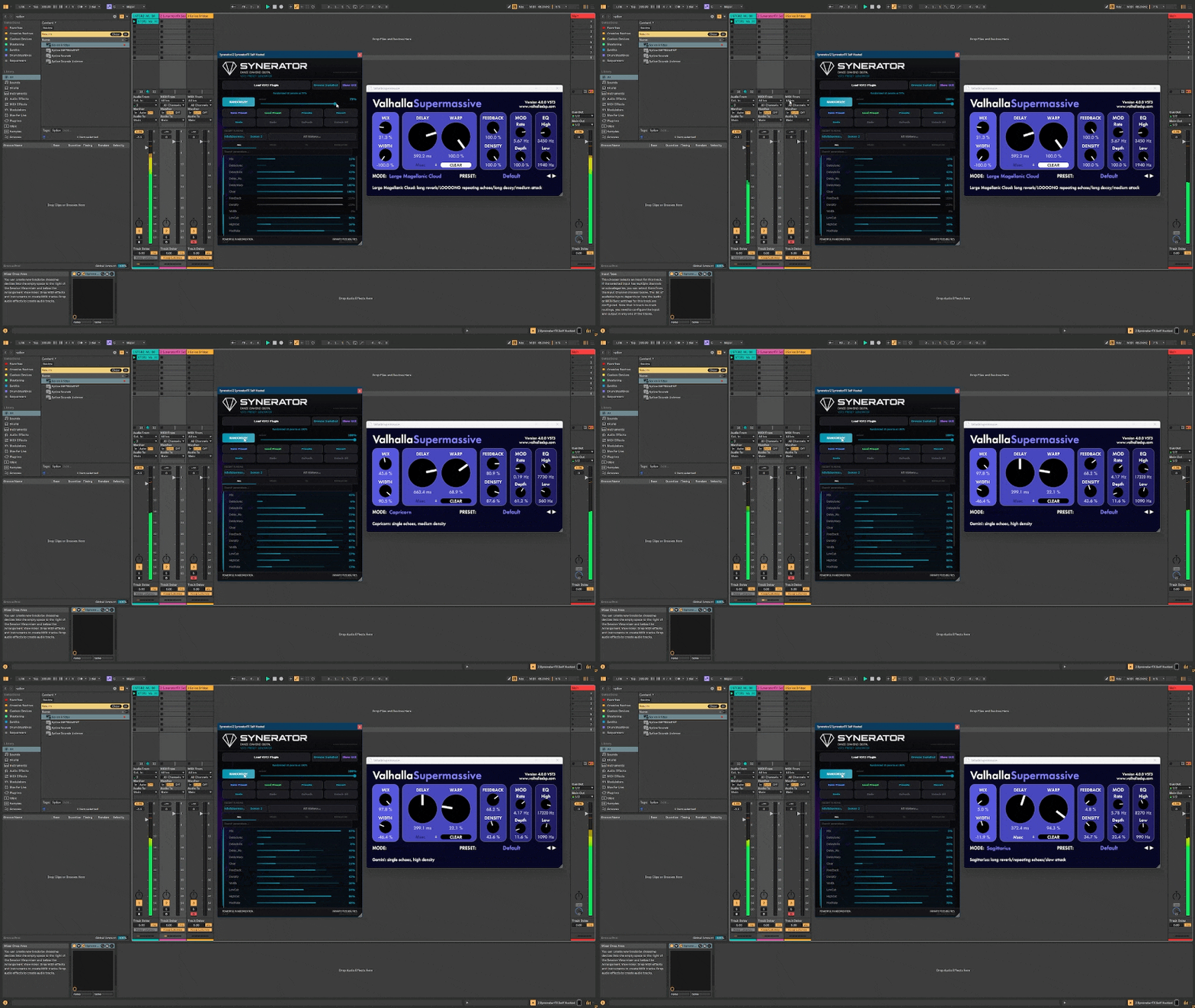
Synerator FX randomizaton workaround // Official FX version coming soon
Part One: Making Randomized Audio FX Presets
I built Synerator to randomize synth VST3s. Load a synth, hit randomize, and it throws new values at every parameter the synth exposes - a fast way to stumble into patches you'd never program by hand. That's the whole idea: happy accidents on demand.
But while I was testing recently, a thought occurred to me. Synerator doesn't actually care what kind of plugin it's hosting. It randomizes exposed parameters. A synth exposes parameters. So does an effect. So what happens if you load an effect plugin into Synerator instead of a synth?
The obvious problem: Synerator doesn't pass audio. It was built to randomize and manage synth patches, not to sit in an audio signal path. So if you load a reverb into it, you can randomize all you want, but you won't hear a thing.
Then it clicked - you don't need to hear it inside Synerator. You just need to save what it makes.
Here's the trick
Load an effect plugin into Synerator. Randomize its parameters until you get something you want to try. Save that as a preset using the effect plugin's own preset save function. Then drop that same effect onto an audio track in your DAW and recall the preset. Suddenly you're hearing a randomized effect patch - one you never would have dialed in manually - running on live audio.
I tested it with Valhalla Supermassive, which felt like the perfect candidate. It's free, it's everywhere, and its delay-and-reverb engine loves to be pushed into extremes. I made six presets in a couple of minutes. Loaded them onto a track. And they sounded genuinely great - huge, lush, strange spaces that I'd never have thought to build from scratch. The kind of thing you hear and immediately want to write a track around.
How to do it yourself
Load your effect plugin into Synerator. I used Valhalla Supermassive.
Hit randomize until you land on a parameter set worth trying. Use the lock buttons to hold anything you want to keep fixed.
Save the result as a preset using the effect plugin's own save function.
Repeat to build up a batch. Six in a few minutes is easy.
Drop the same effect onto an audio track in your DAW and recall your saved presets.
Listen. Your randomized settings are now running on live audio.
A few things to know
This works on effects that expose their parameters to the host and support their own preset save/load. That covers a lot of plugins, but not all - anything that hides its parameters from the host will only randomize partway, the same way some synths do.
And to be clear, this is an experimental, unsupported side-use. Synerator wasn't designed for it. It's a save-and-reload loop, not real-time tweaking, so think of it as a batch generator for sound-design happy accidents rather than a live-tweaking tool. You randomize, save, and audition in your DAW - not exactly elegant, but the results speak for themselves.
Where this is headed
I'll be honest - discovering this made me want to build the real thing. A proper audio-passing FX version of Synerator, where you drop it straight onto a track and hear the randomization happen in real time, is on the roadmap. This little trick is a preview of that idea, something you can play with today while the full version takes shape.
Give it a shot. Load up Supermassive, or whatever effect you've got, and see what falls out. If you make something you love, I'd like to hear about it.
Part Two: Using Synerator in Logic (via a VST3 Host)
If you're a Logic user, you've probably already hit the wall: Logic only loads Audio Unit (AU) plugins, and Synerator is currently VST3. The good news is there's a workaround, and thanks to some resourceful Synerator users, it's been tested and confirmed to work.
The trick is to run Synerator inside an AU plugin that can host VST3s. A couple of options have come up:
Blue Cat Audio's PatchWork - a multi-effect plugin host that loads as an AU inside Logic and can host VST3 plugins internally. You load PatchWork onto a track, load Synerator inside it, and you're up and running.
Plugin Buddy - another VST3-in-AU host that users have reported working with Synerator as well.
Either way, the concept is the same: the host plugin acts as a translator, letting Logic run a VST3 it otherwise couldn't. From there, everything works the way it does in Ableton - you can randomize synths, or use the effect-preset trick from Part One to generate randomized FX patches and save them out.
Now, combine the two ideas and things get interesting. You can run Synerator inside PatchWork in Logic, load an effect plugin into Synerator, randomize it, save the preset in the effect plugin, and then recall that same effect - as a native AU or inside another PatchWork instance - on an audio track in your Logic session. It's a couple of layers deep, but it works, and it means Logic users aren't locked out of any of this.
A note on latency and expectations
These are workarounds, not the final word. Running a plugin inside a host inside a DAW adds a little overhead, and it's a few more steps than a native plugin would be. For sound design and preset generation - which is exactly what this is for - that tradeoff is completely fine. Just go in knowing it's a clever bridge, not a polished native experience. Both PatchWork and Plugin Buddy are paid plugins, though PatchWork offers a demo if you want to test the waters first.
The real fix is coming
I want to be straight about this: both the effect-preset trick and the PatchWork/Plugin Buddy route are temporary bridges. The proper solution is a native audio-passing FX version of Synerator - drop it on a track, load an effect, hear the randomization happen in real time - and a native AU build so Logic users get first-class support without any host-inside-a-host gymnastics. Both are on the roadmap.
For now, though, these workarounds mean you don't have to wait. Whether you're in Ableton, Logic, or anywhere else, there's a way to start making randomized patches today.
If you're on Logic and you try the PatchWork or Plugin Buddy route, let me know how it goes - the more real-world reports I get, the better I can make the official version when it lands.
Wanna give it a try? Check out Synerator HERE.